


Create images
How to vectorize an image with AI and keep it editable
To vectorize an image with AI and keep it editable, give an AI agent the image, a list of the objects it must contain and a way to measure its SVG against the original, then let it correct its drawing over many rounds. A tracer copies the pixels as thousands of loose shapes. In Samsa's vectorization benchmark of October 2026, only such agentic runs gave an editable file that matched the original; single prompts did not.

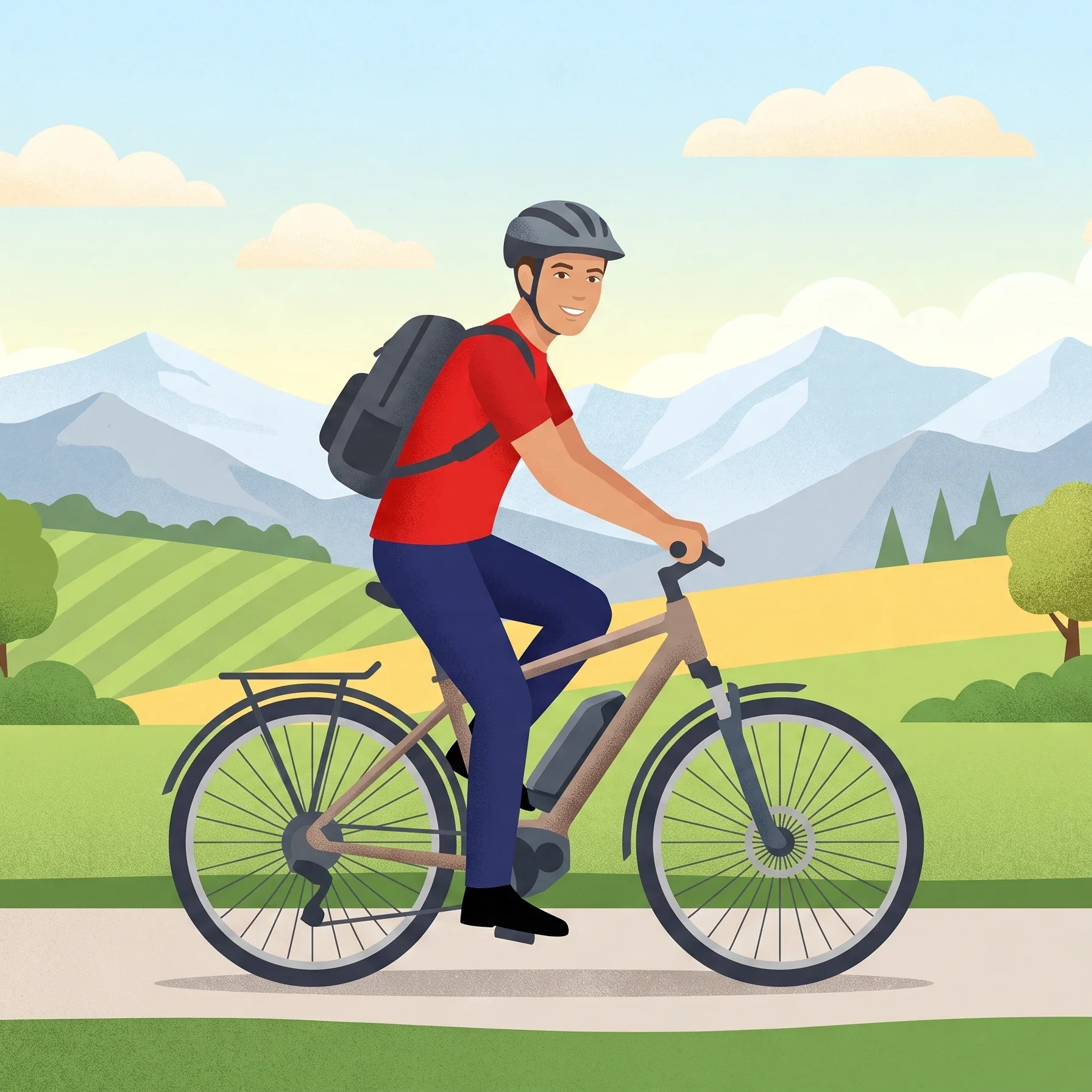
What does it mean to vectorize an image?
Vectorizing an image means redrawing its pixels as geometry, paths, fills, strokes and gradients, usually saved in the W3C's Scalable Vector Graphics format (SVG). A vector file scales to any size without blurring, and, if it is built well, every object in it can be selected, moved and recoloured on its own.
That last part is where most vectorizations fail. There are two very different results that both end in .svg. One is a trace: the image cut into flat colour areas, which looks right and is hard to change. The other is a rebuild: the picture redrawn as the objects a person sees in it, the rider, the bike, the tree, each named and drawn complete. When a brand team asks for an editable SVG, it means the second.
Why is a traced SVG so hard to edit?
A traced SVG is hard to edit because its shapes follow colours, not objects. A tracer looks for areas of similar colour and draws an outline around each. It has no idea that the dark blue strip between the bike frame and the crank is part of a leg, so the leg becomes several unrelated pieces, and the part hidden behind the frame does not exist at all.
In Samsa's vectorization benchmark, an open-source tracer turned the e-bike illustration above into 9,328 shapes, none of them with a name. An agentic rebuild of the same picture had 30 named top-level objects, from «background-sky» to «rider», with the far leg drawn in full behind the bike.
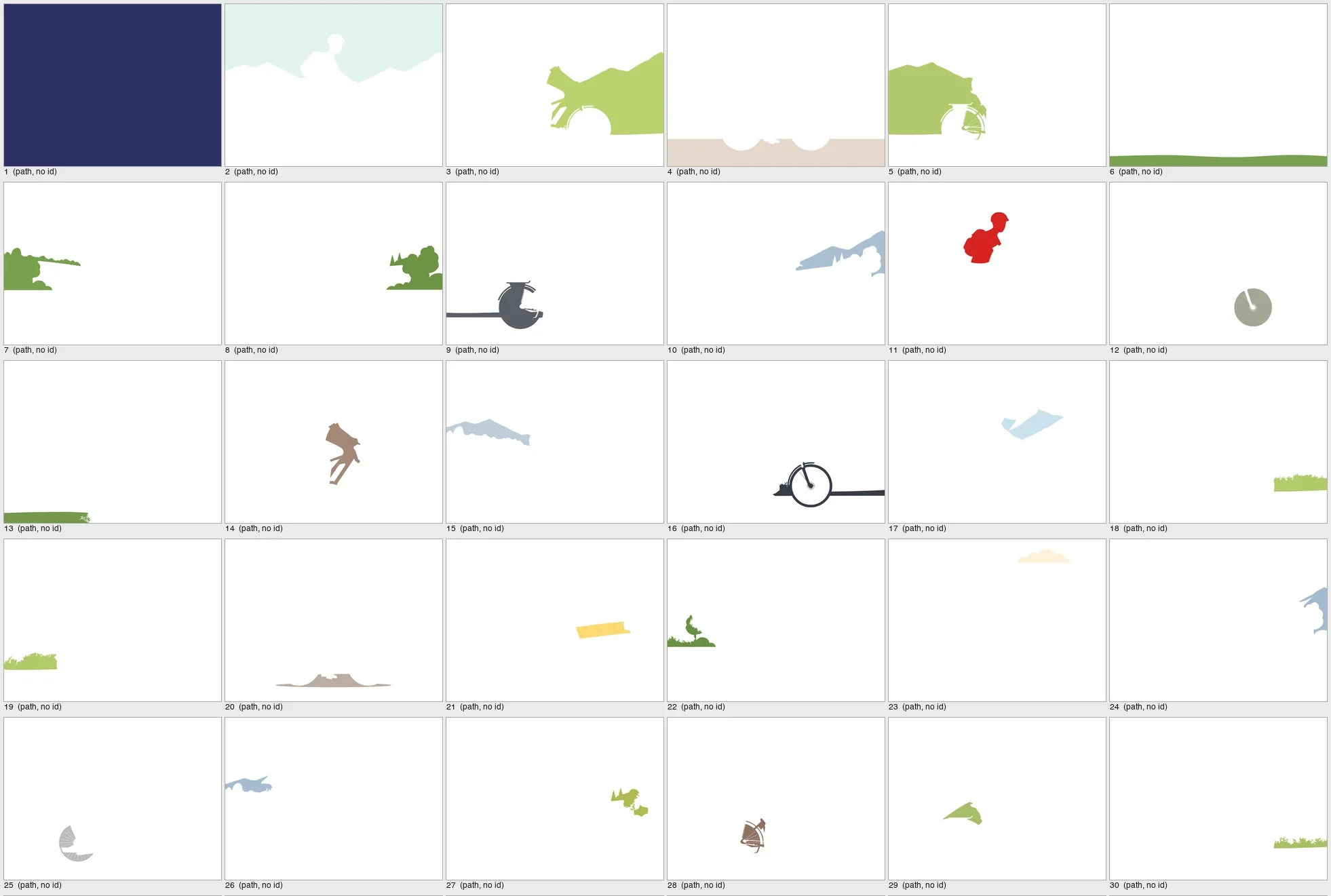
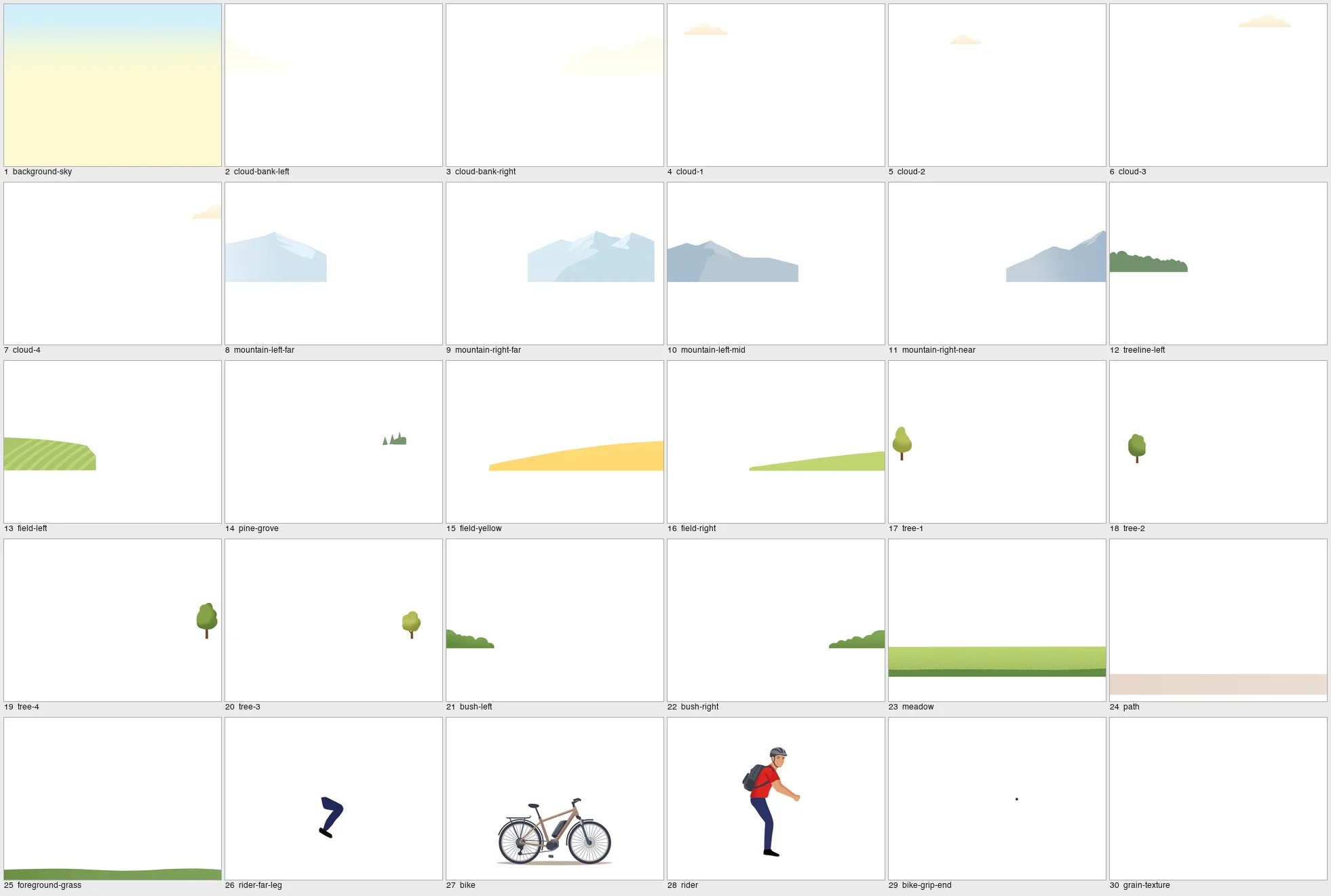
The difference shows the moment someone opens the file. To recolour the jacket in the trace, a designer has to find every fragment that happens to be red. To move the rider in the rebuild, they select one layer.
Which method fits which image?
Use a tracer for simple flat graphics, and an AI agent for illustrations you will edit. A single prompt to a chat model sits in between and is rarely the right choice. The table sums up what each method delivered in Samsa's benchmark.
| Method | What you get | Matches the original? | Cost and time per image |
|---|---|---|---|
| Tracer | Thousands of flat, unnamed shapes, nothing hidden is drawn | Often close on flat images | Free to a few cents, seconds |
| One prompt to a model | A clean, named SVG that is a stylised version of the picture | No run passed the parity gate | Cents to about a dollar, a few minutes |
| AI agent that renders, compares and corrects | Named objects, complete hidden parts, sensible layer order | Most runs passed the parity gate | $5.3–$60.2, 31–128 minutes |
- Logos, icons, flat signage: a tracer is fast and good enough, as long as nobody needs to take the shapes apart later.
- Illustrations for campaigns, explainers, packaging: rebuild them with an agent. These are the files people come back to, to swap a colour or reuse a character.
- Photographs: keep them as pixels. A photo has no clean objects to draw, and any vector version is either a huge trace or a stylised drawing.
How to vectorize an image with AI, step by step
The best runs in Samsa's vectorization benchmark followed the seven steps below. Any AI coding agent that can read images, run code and write files can follow them too.
- Start from the largest original you have. A PNG at full resolution, not a screenshot or a compressed JPEG. Done when the file is the size it was exported at and shows no compression blocks when you zoom in.
- Write an inventory of the objects. List every object the file must contain and name it the way a designer would look for it: sky, clouds, far mountains, rider, far leg, bike, front wheel. The benchmark's e-bike inventory has 53 entries. Done when someone who has not seen the picture could check the finished file against the list.
- Define what done means, in numbers. Tell the agent how its render will be compared with the original: average colour difference, structural similarity, the worst local area. The benchmark's parity gate uses eight such criteria. Without a measurable target, a model stops when its drawing looks plausible to itself.
- Ask for a rebuild, not a trace. Every inventory object becomes one named group, drawn complete where other objects cover it, in back-to-front order. Forbid embedded bitmaps, clip paths that fake hidden parts and transforms baked onto groups.
- Let the agent iterate, with a cap. It renders the SVG, measures it, fixes the worst areas and repeats. Set a ceiling, for example three hours or 25 measured rounds, and have it keep its best version. Done when the target from step 3 is met, or the cap is reached and you know how far off the file is.
- Review the focal details at 100 %. Faces, hands and mechanical parts carry the picture. Compare them side by side with the original. Done when nothing there reads as a different person or a different part.
- Open the layers before you accept the file. Run the checks in the next section. A file that looks right and fails them is a trace with extra steps.
How do you check that an SVG is really editable?
Whether an SVG is editable shows when its objects are hidden, moved and counted, not when the file is looked at. The six checks below are the ones the structure score of Samsa's vectorization benchmark is built on, and each takes a few minutes in any vector editor.
- Names: every top-level group has a meaningful name. Labels like «path12», «g3» or «Layer_1» do not count.
- Coverage: every object on your inventory exists as its own group. Count them.
- Hidden geometry: hide the object in front. The object behind must be whole, not a cut-out of whatever was visible.
- Economy: objects are drawn with a reasonable number of points. Thousands of nodes for a cloud means it was traced.
- No shortcuts: no embedded bitmap, no clip path used to fake what lies behind, no transforms baked onto groups that make them jump when moved.
- Layer order: the layer list reads back to front, the way the scene is built.
Quick test
Select the main character and drag it to the side. In a rebuilt file the background behind it is complete. In a traced file you see a hole in the shape of the character.
What does AI vectorization cost, and how long does it take?
An editable rebuild costs real compute. In Samsa's vectorization benchmark (edition 2026.10), the agentic runs cost $5.3–$60.2 per illustration in API-equivalent list prices and took 31–128 minutes. The textured e-bike cost more than the flat laptop image for every agentic configuration measured on both images.
A single prompt costs cents to about a dollar and a few minutes, and a tracer is free or close to it and takes seconds. Neither gives you an editable file of an illustration at parity. The full results, with cost and time for every model and tool, show where each extra dollar stops buying quality.
Plan for variation as well. The same agentic configuration on the same image moved by up to 4.0 points of score between runs, and its cost by up to 1.7 times.
Which mistakes cost the most time?
- Judging by the thumbnail. At small sizes a trace and a rebuild look the same. The difference only shows in the layers panel.
- Feeding a downscaled copy. Many chat tools shrink an uploaded image before the model sees it. Fine detail lost at that step never comes back.
- Skipping the inventory. Without a list, the model decides what counts as an object, and small parts like a grip end or a strap get merged into their neighbours.
- Ignoring texture. Grain and stipple are part of the look. Ask for them as a separate, named layer so they can be switched off, instead of thousands of dots baked into every shape.
- Trusting one run. Results vary from run to run. For a file that matters, run twice and keep the better one, or plan a human pass on the faces and hands.
Frequently asked questions: vectorize an image with AI
Can an AI model vectorize an image from a single prompt?
It can produce an SVG, but not one that matches the original. In Samsa's vectorization benchmark, none of the single-shot and fixed-loop runs passed the parity gate, whichever model made them. The files were clean and well named, but they were stylised redrawings. Matching the original took an agent that renders its SVG, measures it against the image and corrects it over many rounds.
Is a traced SVG an editable SVG?
Technically yes, practically rarely. A trace is made of thousands of flat shapes cut along colour edges, with no names and no hidden parts. You can change a single shape, but you cannot move an object, because it does not exist as one. For logos and icons that only need to scale, that is enough. For illustrations you want to edit, it is not.
What resolution should the source image have?
Use the largest version you have, as a PNG straight from the export. The benchmark's textured image is 2400 × 1792 pixels; at that size the agent can see spokes, grain and the edge of a helmet strap. A screenshot or a compressed JPEG adds blocks and blur that the agent will try to reproduce. Upscaling a small file first does not add the missing detail.
Can I vectorize a photo with AI?
You can, but the result is rarely useful. A photograph has soft light, noise and countless small tones, so a faithful vector version needs an enormous number of shapes, and a compact one becomes a stylised drawing. Vectorization pays off for illustrations, icons and graphics with clear shapes. Samsa's benchmark measures illustrations only.
How long does it take to vectorize an illustration with AI?
For an editable rebuild, expect 31–128 minutes of agent time per illustration, measured on the benchmark's two images, and longer for textured pictures than for flat ones. A tracer takes seconds and a single prompt a few minutes, but neither gives you an editable file at parity. Add time for your own review of the layers and the focal details.
Does Samsa export images as SVG?
Yes. In Samsa's AI image generator you can turn an image into an SVG and download it as a layered file to hand to your designers. Samsa built the vectorization benchmark to measure how far current models and tools get on exactly this task, and publishes the results with the method.
Sources
Generate on-brand images and download them as SVG
Train Samsa on your brand, create the image, then export a layered SVG for your designers.