


Create images
Corporate Christmas card: create the design in your brand style with AI
Creating a corporate Christmas card in your brand style with AI takes two parts: a style model supplies your look, the prompt the Christmas scene. Train the model on two to five images your brand already uses; in Samsa, that takes about 15 seconds and is free on every plan. The card, email header and social formats then share your look instead of an image generator’s default, and you set the greeting in your brand typeface.


How do you create a corporate Christmas card with AI?
To create a corporate Christmas card with AI, you need a style model for your look and a prompt for the Christmas scene. In five steps:
- Pick two to five images that already show your brand’s look: campaign visuals, illustrations, website imagery. No Christmas pictures.
- Train a style model on these images.
- Write a motif sentence: one sentence that describes the Christmas scene, with no colours or style words. Share it with the team.
- Generate every format with the same model and the same motif sentence: card, email header, square post, story.
- Set the greeting, logo and print data in your layout or email tool.
Samsa tested this workflow for the guide on a fictional brand: one style model trained on four everyday illustrations, one motif sentence, four formats. The figures below come from this Samsa test, run on 9 October 2026.
What makes a corporate Christmas card look like your brand?
What makes a corporate Christmas card yours is its look, not a big logo. People recognise your card by your brand colours, your illustration or photo style and your composition, whether it goes to customers, partners or employees. The logo goes small, on the back or next to the signature.
The look belongs in the model, the season in the prompt, the format in the settings, the greeting and logo in your layout:
| Element | Where it belongs |
|---|---|
| Image style: colours, light, line, composition | Style model |
| Christmas motif, scene | Prompt (the motif sentence) |
| Format | Aspect ratio and resolution when you generate |
| Greeting, brand typeface, logo, spot colours | Your layout or email tool |
| Print data: CMYK, bleed | Layout file and printer |
Put an element in the wrong row and the usual problems follow. Describe the image style in the prompt, and every generation comes out a little different. Put the greeting in the picture rather than the layout, and it becomes hard to correct.
Why doesn’t a prompt-only Christmas motif look like your brand?
A prompt-only Christmas motif doesn’t look like your brand because, without a style model, an image generator reads your words afresh every time, in its own default look. When several people in the team write prompts, the look drifts further: the card from marketing, the header from communications and the post from HR end up looking like three different companies.

In the Samsa test, the same motif sentence produced a photorealistic night scene in dark blue and grey without the model. With it, the result was the house style: teal and coral, flat shapes, plenty of empty space.
The usual workaround is to generate a generic image and then lay the logo, brand colours and fonts over it in a design tool. The card carries your logo, but the picture itself stays generic. The other workaround is style words in the prompt, such as colour names and “flat illustration”. They help, but everyone phrases them a little differently.
Our guide to prompts, reference images and your own model compares when a prompt is enough, when a reference image helps and when your own model pays off.
How do you train a style model on your brand’s look?
You train a style model on images your brand uses all year: campaign visuals, illustrations, website imagery. Not on Christmas pictures. The model should learn your look; the season comes from the prompt later. A set of Christmas pictures would teach the model “Christmas” instead of “your brand”.
In Samsa, one image is enough to train a style model; two to five are recommended. Training takes about 15 seconds and is free and unlimited on every plan. In the Samsa test, Samsa’s own timestamps put 13.3 seconds between creating the model and the end of training. From submitting the images to reading back the finished model, our client counted 93 seconds, including preparation and polling.
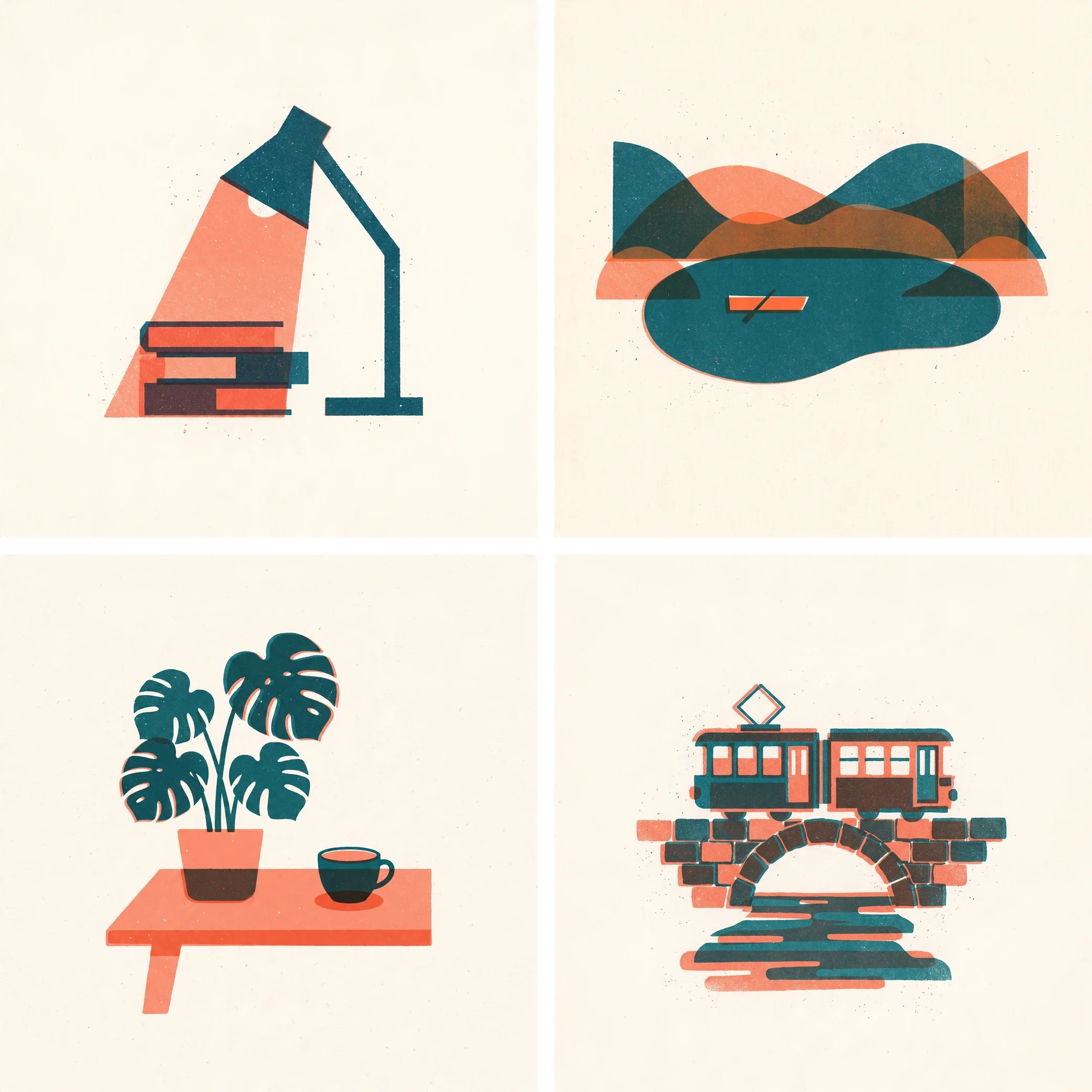
The four images in the Samsa test show everyday subjects in one strict house style: two inks, teal and coral, on warm paper, flat shapes, plenty of empty space. That strictness is what makes the set useful: all four share the look and differ in subject. Our guide on how to train AI on your brand guidelines covers building a training set and managing the model.
How do you write the prompt for the Christmas motif?
Write the prompt for the Christmas motif as one motif sentence that everyone shares, plus one composition line per format. Leave out style words; the model supplies the style. Add a short list of things that must not appear.
The motif sentence from the Samsa test: “A single snow-covered fir tree decorated with small round baubles and one star on top, standing on a gentle snowy hill under a night sky with a few small stars.” Not one word about colour or style.
Then one composition line for each format:
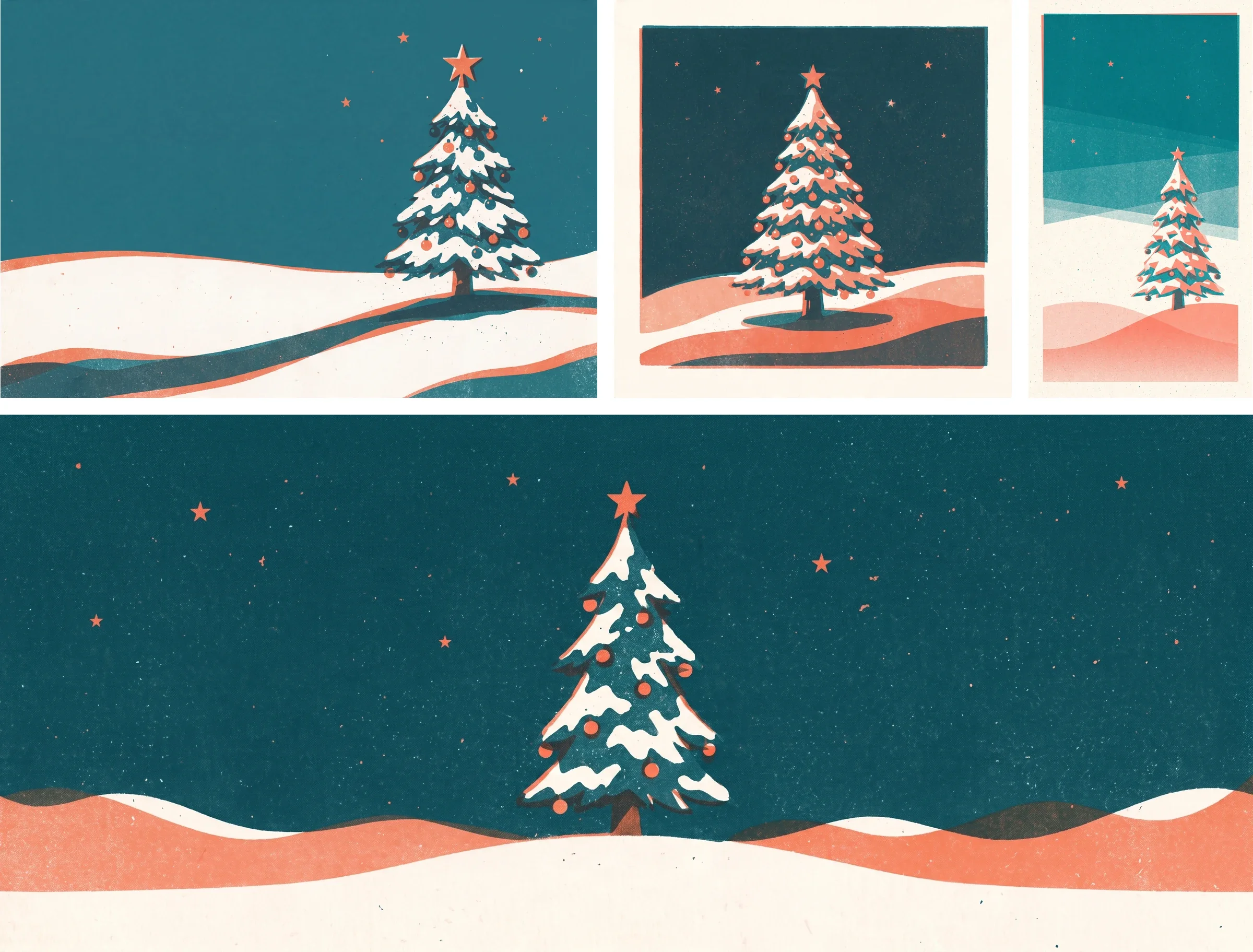
- Card, 3:2: the tree in the right third, the left half empty as space for the greeting.
- Email header, 21:9: a wide panorama, the tree in the centre, low hills running to both edges.
- Square, 1:1: the tree centred, about three quarters of the image height.
- Story, 9:16: the tree in the lower half, the top third open sky for text.
The Samsa test excluded text, logos, people, Santa Claus and religious symbols, which keeps the motif a non-denominational winter scene for a mixed audience. You can prompt Samsa in English, German, French or Italian.
Tip
Put the motif sentence in the team’s briefing doc. If you need one more format in December, generate it from the same words with the same model.
Which formats do you need for the card, email and social media?
For the card, email and social media you need one motif in four formats: the card in 3:2, the email header in 21:9, a square post in 1:1 and a story in 9:16. Generate each format in its own aspect ratio rather than cropping one picture to fit. Samsa creates formats from 9:16 to 21:9, at 1K, 2K or 4K. If you need another format later, AI resize adapts a finished image; you choose whether to extend or crop it.
| Format | Generated in this guide | Provider’s spec |
|---|---|---|
| Printed card | 3:2 (A6 and A5: 1:1.41) | 300 dpi at final size, 2 mm bleed (Onlineprinters) or 3 mm (WIRmachenDRUCK), CMYK |
| Email header | 21:9 | Templates 600 or 660 px wide, images 600-1,200 or 660-1,320 px (Mailchimp) |
| Instagram post | 1:1 | 4:5 to 1.91:1 when publishing through Meta’s API |
| Instagram story | 9:16 | 9:16 recommended (Meta) |
| LinkedIn post with a link | Landscape, e.g. 16:9 | 1.91:1 at 1,200 × 627 px; other ratios show with white padding (LinkedIn) |
In the Samsa test, the 2K images measured 3,168 × 1,344 pixels for the 21:9 email header, 2,048 × 2,048 for the 1:1 square and 1,536 × 2,752 for the 9:16 story.
Printed card: what does the printer need?
The printer needs a file at 300 dpi at final size, with bleed all round, a safety margin for text, in CMYK. The values differ between printers, so follow your printer’s specifications:
- Onlineprinters, portrait A6 greeting card: final size 105 × 148 mm, data size 109 × 152 mm, so 2 mm bleed all round, at least 4 mm from the trim edge, 300 dpi, CMYK with FOGRA51 (PSO Coated v3) for coated and FOGRA52 (PSO Uncoated v3) for uncoated stock. Its A5 has a data size of 152 × 214 mm, its landscape DL card 214 × 109 mm.
- WIRmachenDRUCK, square card 120 × 120 mm: data size 126 × 126 mm, so 3 mm bleed, and a 3 mm safety margin.
- Calculated for 300 dpi in landscape, like the 3:2 card in the test: A6 with 2 mm bleed needs 1,796 × 1,288 pixels, A5 2,528 × 1,796 pixels, DL 2,528 × 1,288 pixels.
With either printer, keep text, logo and signature at least 6 mm from the edge of the file: bleed plus safety margin. A6 and A5 are 1:1.41, slightly narrower than 3:2, so a landscape layout loses a few millimetres on the left and right. Plan for that in the composition.
The 4K card in the Samsa test measured 5,056 × 3,392 pixels. For larger formats, Samsa lets you generate up to 4K and upscale up to 38K with Crystal.
Samsa exports WebP, JPG and PNG. CMYK conversion, and any Pantone or HKS spot colour for the logo, come in at the layout stage or at the printer. The generated image is one element of the print file; the file itself is put together in your layout.
Email header: what width?
An email header is 600 or 660 pixels wide in Mailchimp templates (image widths are in the table). The greeting as text matters more: according to Microsoft, classic Outlook blocks automatic picture downloads from the internet by default. So write the greeting as live text in the email, not into the picture, and give the header alt text. Mailchimp calls alt text essential for accessibility and for anyone who can’t download images, and WCAG requires text rather than images of text at level AA wherever the technology allows it.
Social media: Instagram and LinkedIn
For Instagram, generate the square and the story: the square sits inside the 4:5 to 1.91:1 range Meta gives for feed images published through its API, and for stories Meta recommends 9:16 to avoid cropping or blank space.
For LinkedIn, generate a landscape format such as 16:9 with the same model and motif sentence. It shows in full, with subtle white padding; to lose the padding, crop it to 1.91:1 in your layout tool.
Where does the greeting go?
The greeting goes into the space you reserved in the composition, set in your brand typeface in your layout or email tool. That is why the card’s composition line asks for an empty left half.
Text that a style model puts into a picture follows your brand’s typographic style. Don’t count on it becoming your exact typeface, though. Set the greeting, the company name and anything that has to be spelled right in the real typeface in your layout. For quick social versions, Samsa has text overlays in the editor.

A card for all of Switzerland’s language regions can carry the greeting in several languages, like the placeholder in the figure. The questions below cover what to write in a business Christmas greeting.
What does the motif cost across all formats?
A Christmas motif in the four formats costs about 50 credits in Samsa, plus the variants you discard. An image costs 5 credits at 1K, 10 at 2K and 20 at 4K, and edits are tiered the same way. The card at 4K (20 credits) plus the email header, square and story at 2K (3 × 10) comes to 50 credits, a tenth of the Starter plan’s monthly credits.
Variants generated and kept per format in the Samsa test: card 4/2 (one kept as a runner-up), email header 2/1, square 5/1, story 3/1. The greeting took three edits before the characters and their placement were right. The whole test, every generation and edit including the training images, the comparison image and the featured image, used 395 credits: the balance went from 1,800 to 1,405 credits, and training the model cost nothing.
Training the style model is free. The Starter plan costs (as of October 2026) CHF 49 a month, or CHF 39 a month billed yearly, excluding VAT, for 500 credits a month: about 100 images at 1K. Creating an account is free, but it includes no credits. Current credits per image are on the pricing page.
Does an AI-made Christmas card feel impersonal?
An AI-made Christmas card feels a little less personal once recipients know the picture came from an AI; studies of advertising suggest as much. In a study published in 2025 by the NIM (Nuremberg Institute for Market Decisions), 1,000 respondents each in the USA, the UK and Germany saw the same drink ad, introduced either as a photo or as “a completely AI-generated image”. The AI version came across as less emotionally touching: 4.25 instead of 4.5 points on the same scale. NIM calls the effect small but meaningful. In a second experiment, the AI label hurt traditional products more. Our reading: few occasions are more traditional than Christmas.
According to NielsenIQ, consumers in a 2024 study intuitively identified most AI-generated ads and found them more annoying, boring and confusing. McDonald’s Netherlands withdrew an AI-generated Christmas ad in December 2025, days after release, following an online backlash. There is contrary evidence too: according to a 2026 MediaScience test with 900 people in the US, AI disclosure labels on video ads did not hurt brand recognition or attitudes to the ad and the brand.
In practice:
- A person, not the generator, chooses the motif and the look.
- Check every image at print size before it goes out.
- Prefer a stylised motif to photorealistic people or real places: a card should not be mistaken for a photo. Whether you need a label is covered in the questions below.
- Sign by hand.
The printed card is still worth the effort. In an Ipsos survey of working adults in Germany (October 2025), 74% say they read Christmas cards but only 38% say they read Christmas emails. The figures are for Germany, not Switzerland.
What doesn’t the style model do for you?
A style model only supplies the look: printing, the greeting, the logo, print colours, rights and visible labels stay with you.
- It doesn’t print or send cards.
- It doesn’t write your greeting.
- It doesn’t place your logo or replace your brand typeface; CMYK and spot colours stay with the layout and the printer.
- It doesn’t clear rights: you need to hold the rights to your training images.
- It adds no visible label. Samsa handles the machine-readable marking; in the Samsa test, all 13 kept originals carried a C2PA manifest (the check confirmed it was there, not its certificate chain). The pictures on this page are composited or converted for the web and no longer carry one. More on C2PA marking and visible labels.
Corporate Christmas card: frequently asked questions
What do you write in a company Christmas card?
A company Christmas card needs only a few personal lines: thanks for working together this year, good wishes for the holidays and the new year, and a handwritten signature. No advertising, no discount codes, no product news; the card is a thank-you, not a mailing. For employees, the text can be more specific, such as a moment from the year you shared. For a mixed audience, “Season’s Greetings” is the safe choice, because not everyone celebrates Christmas.
Can I use an AI motif commercially on a corporate Christmas card?
Yes, on every Samsa plan, provided you hold the rights to the images you train your style model on. Usually these are images your brand already uses. If they come from an agency, a photographer or a stock library, check that your licence covers training. Without those rights, Samsa cannot give you commercial usage rights.
Does an AI-generated Christmas card have to be labelled?
Whether an AI-generated Christmas card has to be labelled depends on the motif. The EU AI Act requires disclosure for deep fakes: images that resemble existing persons, objects, places, entities or events and would falsely appear to a person to be authentic or truthful. Article 50, which sets these transparency obligations, has applied since 2 August 2026. The European Commission adopted guidelines on it on 20 July 2026; they are not binding. Samsa marks generated images in a machine-readable way with C2PA Content Credentials and an invisible watermark. Visible labels are available based on the official EU icons or as your own label in your brand’s design. More on the security and labelling page.
Can I use the motif for New Year greetings too?
Yes. The style model stays the same; you only change the motif sentence, for example to a winter sky with fireworks or a first morning in the snow instead of the decorated tree. That way your business New Year greetings match the look of the Christmas card. The difference is mostly timing: a Christmas card arrives before the holidays, a New Year card at the start of the year. If you miss December, send a New Year card in January.
Do I need my own model, or is a good prompt enough?
For a single image, used once, a good prompt is enough. Your own model pays off when the same motif appears in several formats, when the card comes back every year, or when your brand should look the same across many images. Because the style model learns your look for the whole year, not just for Christmas, you keep using it afterwards. Our guide on how to create on-brand AI images explains when a model is overkill.
Sources
- Grusskarten Hochformat A6
- Grusskarten Hochformat A5
- Grusskarten Querformat DIN lang
- Vorlage zur Gestaltung einer Karte – Quadrat, 12 x 12 cm, 4/4-farbig
- Image Recommendations for Content Blocks
- Block or unblock automatic picture downloads in classic Outlook email messages
- Understanding Success Criterion 1.4.5: Images of Text
- IG User Media
- Image specifications for your LinkedIn Pages and Career Pages
- Weihnachtskarten & E-Mails – Insights zur Relevanz in 2025
- Transparency Without Trust
- NIQ research uncovers hidden consumer attitudes toward AI-generated ads
- Not lovin’ it: McDonald’s pulls AI-generated Christmas ad after social media backlash
- AI disclosure labels don’t hurt ad performance: Here’s what the numbers say
- Regulation (EU) 2024/1689 (Artificial Intelligence Act)
- Article 50: Transparency obligations for providers and deployers of certain AI systems
- Guidelines on the transparency obligations for providers and deployers of certain AI systems
Create your Christmas motif in your brand style
Train a style model on your brand images, free and in about 15 seconds. Creating an account is free; images use your plan’s credits.