Samsa Samsa

How to create on-brand AI images: prompt, reference image or your own model

You can create on-brand AI images in three ways. A prompt describes the look in words: fast, but every result is a fresh interpretation. A reference image shows the AI one example to follow for a single generation. A model you train learns a specific style, product, person or scene from one image (two to five recommended) and keeps it the same for everyone on your team. Most teams combine all three.

What does on-brand mean for an AI image?

An AI image is on-brand when the things your brand depends on come out the same every time. Before you pick a method, decide which of two kinds of thing that is, because the answer drives everything else in this guide.

  • A look. Your colors, a kind of light, a photographic or illustrated feel, a mood. A look can be described, so words and example pictures get you a long way.
  • An identity. One specific thing people must recognize: your illustration style, your product with its packaging, a named person, your store or office. An identity has to match, not merely resemble.

Most brand work needs both. A campaign image of your product in your house style needs the look (colors, light) and two identities (the product and the style). Keep that split in mind: the three approaches differ in exactly which of the two they can hold. Samsa offers all three, and this guide sets them side by side, including when training a model is overkill.

General image generators drift for a plain reason. A general model knows what a water bottle looks like, not what your water bottle looks like. Researchers described this gap in 2022: large text-to-image models produced high-quality, varied images from a prompt, yet they lacked the ability to mimic the appearance of a specific subject from a set of reference pictures. Words are also a coarse way to specify a picture. A 2023 paper on image prompts puts it directly: getting the image you want from a text prompt alone is very tricky and often involves complex prompt engineering.

Approach 1: how far does a prompt get you?

A prompt gets you a consistent look, as long as the look can be put into words and everyone on the team writes it the same way. It is the quickest way to start, and it needs no setup at all.

What can a prompt hold?

Anything you can describe: the subject, the composition, the light, the mood, a named style such as flat illustration or warm documentary photography. A few features make prompting less fragile in an AI image generator for brands. In Samsa you save your brand colors once (primary, secondary and accent) and select them for a generation instead of typing color codes every time. A prompt improver turns a short idea into a detailed image description. And you can prompt in English, German, French or Italian, which helps a Swiss team that works in more than one language.

Where does prompting break?

Every generation is a new interpretation of your words. That is fine for a mood and a problem for anything specific. Describe your product and the model invents a plausible product; describe your CEO and you get a plausible stranger. Run the same prompt twice and the details move.

The second break is the team. Ten people write ten versions of the same prompt, and ten slightly different looks come back. With prompting alone, the consistency lives in each person’s wording, not in the tool.

How do you make prompts more consistent?

Agree on one template and share it. Six fields cover most brand images:

A shared prompt template for brand images
FieldWhat the team agrees on
SubjectWhat is in the picture, in one sentence
StylePhoto or illustration, and which kind: documentary, studio, flat vector
LightTime of day, hard or soft, warm or cool
CompositionFraming, camera distance, where the empty space for a headline goes
ColorsThe brand palette, or the brand colors saved in the tool
AvoidWhat must never appear: other logos, text in the image, a clashing color

Best for: exploring ideas, one-off images, backgrounds and generic scenes, and any brief without a recurring product, person or place.

Approach 2: what does a reference image add?

A reference image shows the AI what you mean instead of describing it, for one generation at a time. You add an existing picture to your prompt, and the result follows its look, colors or composition.

Two kinds of example images

In this guide, a reference image is a picture you hand the AI at generation time, for one result. The pictures you train a model on are training images. Some product pages, Samsa’s own training page included, also call training images reference images; there they mean the second kind.

What does a reference image hold?

Things that are hard to put into words: a particular palette, the grain of a photo, the way a layout is balanced. The 2023 paper that introduced a method for image prompts cites the old saying that an image is worth a thousand words, and that sums up the case for this approach. If you already have one campaign visual that works, showing it beats describing it.

Where does a reference image break?

  • It guides one result; nothing is learned. The next generation starts from zero unless you attach the picture again.
  • The team result depends on the reference each person picks. Two people, two references, two looks.
  • It steers toward an example; it does not teach the model your product. For a product or a face that has to be recognizable in every image, the next approach is the better tool.
  • You need the rights to the picture. Upload only images you own or have licensed.

In Samsa, uploading your own images costs no credits. You can use them as references, edit them or create variations of them.

Best for: matching one existing campaign visual, and one-off variations of an asset you already have. It is also the quick answer if you want an AI image made from your own photo, once. If the subject of that photo has to come back again and again, read on.

Approach 3: what does a trained model keep constant?

A trained model keeps one specific thing the same across every image: a style, a product, a person or a scene. You show it a few pictures of that thing once, and from then on anyone on your team can put it into a new image by name.

The technique is not new. The 2022 DreamBooth paper showed that fine-tuning a pretrained text-to-image model on just a few images of a subject lets it create new, photorealistic images of that subject in different scenes. Models and methods have moved on since, but the principle holds: the identity is learned, not described.

Which kinds of model can you train?

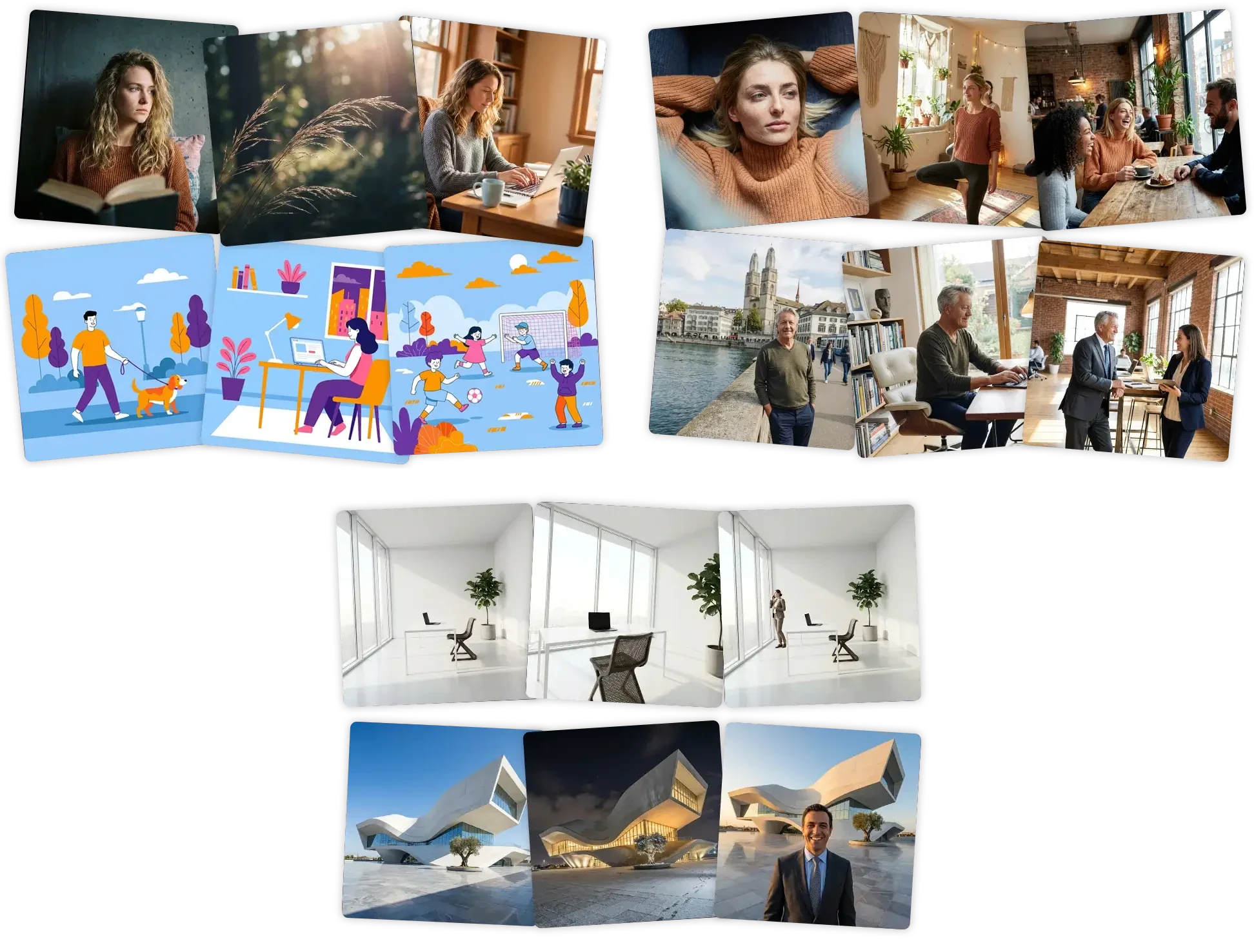
Samsa trains four types of model, one for each kind of identity a brand tends to repeat:

  • Style: an illustration style, a photographic look or a design system.
  • Products: a bottle, a package, a device.
  • People: a founder, a spokesperson or a brand character.
  • Scenes: your office, your store or another place that belongs to your brand.
Six images in two styles, two people each shown in three settings, and one office and one building shown in several variants
Examples from the Samsa training page, all generated with Samsa: two styles (top left), two people (top right) and two scenes (bottom). Each stays recognizable from one image to the next.

What do you need to train one?

One image is enough to train a model; two to five are recommended, for every model type. Choose pictures that show the product, person, style or place clearly, since the model learns what the training images show. For a product, a product model from a single photo is a realistic starting point. The checklist for preparing training images covers which pictures work for each model type and what to check before you upload.

In Samsa, training takes about 15 seconds, and training is free and unlimited on every plan. Generating images with the model uses credits, like any other generation.

Fine-tuning and LoRA

You will meet both terms when you read about custom models. Fine-tuning means continuing to train an existing model on your own images. LoRA (low-rank adaptation) comes from a 2021 paper on language models: it keeps the original model’s weights frozen and trains a small set of added parameters, which greatly reduces how much has to be trained. Both are general techniques, not a description of how Samsa trains its models.

Can you combine several models in one image?

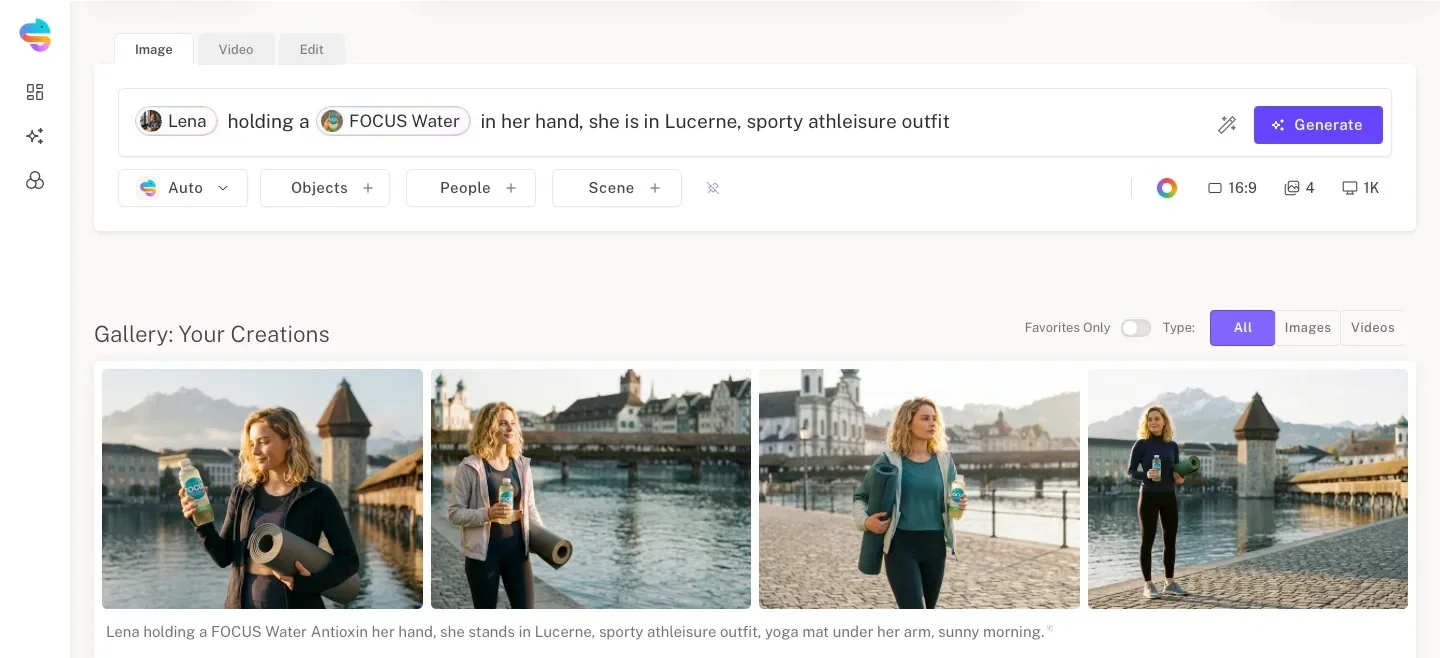
Yes. With Model References you mention several trained models in one prompt, for example a person, a product and a style, and they come together in a single generation. The screenshot below shows a prompt that names a person model and a product model. All four results show the same woman with the same bottle, in four different compositions in Lucerne.

Samsa prompt naming a person model and a product model, above four generated images of the same woman holding the same bottle in Lucerne
Two trained models in one prompt: the person and the product stay the same while the pose and framing change. Screenshot of the Samsa app; the person and all four images are generated with Samsa.

Who can use a trained model?

Anyone on the team who has access to it. This is where a trained model pulls ahead of the other two approaches: the identity sits in the model, not in each person’s wording or choice of reference, so the intern and the art director start from the same product and the same style. Samsa describes itself as an AI that learns your branding and creates consistent images and videos, with no design skills needed. If a recurring product, face or style is your problem, train a custom AI model on your brand.

When is a trained model overkill?

A trained model is overkill when nothing specific has to come back. Skip training if one of these describes the job:

  • You need one image, once, for a single post or slide.
  • The look belongs to one campaign and will change next season.
  • You are still exploring directions and don’t know what you want yet.
  • The brief has no recurring product, person, place or illustration style.
  • You make a handful of images a year, on your own.

In those cases a good prompt, maybe with a reference image, does the job, and a model would be one more thing to look after.

The obvious objection: if training is free, why not train anyway? Because credits are not the only cost. Someone has to pick the training images, check the first results and train again when the product or the style changes. That effort pays off when the same product, face or style shows up week after week. For a single image it does not.

That is also who Samsa is built for: brand and marketing teams that produce brand visuals every week. If you make a few images a year for a side project, you don’t need a trained model, and you probably don’t need Samsa either.

How do the three approaches compare?

In one sentence: a prompt holds a look, a reference image holds one example for one result, and a trained model holds a specific style, product, person or scene for the whole team.

Prompt, reference image and trained model compared
AspectPromptReference imageTrained model
What you give the AIWords, plus your brand colorsOne example picture per generationOne image to train on (two to five recommended)
What stays constantA described lookThe example’s look or composition, for that one resultA specific style, product, person or scene
Across a teamDepends on how each person writesDepends on which picture each person picksThe same model for everyone
SetupNoneNone, but you need the rights to the pictureAbout 15 seconds of training in Samsa; free and unlimited on every plan
Best forExploration, one-offs, generic scenesMatching one existing visualRecurring brand elements, weekly production
Where it breaksA specific product or face is re-imagined each timeNothing is learned; one result at a timeOverkill for one-offs and short-lived looks

Read the table by row, not by column. If the row that matters most to you is "Across a team", the answer is a trained model. If it is "Setup", start with a prompt and see how far it gets you.

Which approach should you use? A four-question check

Answer four questions in order and stop at the first one that settles it.

  1. Does a specific product, person, place or illustration style have to reappear? No: write a prompt and add your brand colors. Yes: go to question 2.
  2. Once, or again and again? Once: use a reference image. Again and again: go to question 3.
  3. Will several people create these images? Yes: train a model, so everyone starts from the same one. No, but the subject recurs often: a model still saves you from explaining the same thing in every prompt.
  4. Do several brand elements have to appear in one image? Train a model for each and combine them in one prompt.

The most common mistake I see in teams: they try to pack their brand style into ever longer prompts. A prompt describes a look, but it doesn’t remember it. As soon as two people on the team generate images, the brand starts to look double. If you need images for the same brand every week, train the style once. A single reference image is already enough for that, and with two to five it gets really good. And if you only need a single image now and then, a good reference image often gets you further than a model of your own.

Niklas Jung, Founder & CEO, Samsa

Most brand teams answer yes to the first question for at least part of their work, which is why the honest answer is rarely a single approach.

How do teams combine the three in practice?

In practice the approaches stack. Trained models carry the identities, the prompt carries the situation, the brand colors carry the palette, and a reference image nudges one composition when you need it.

Take a typical request: your product on a café table, in your illustration style, for a social post. The product model and the style model make sure it is your bottle and your style. The prompt says café table, morning light, space for a headline at the top. The saved palette keeps the colors inside your brand. And if the post should mirror last month’s layout, you attach last month’s post as a reference for this one image.

Each layer does one job, so each one stays simple. Nobody has to describe the product in words, and nobody has to hunt for a reference just to get the colors right. That is the difference between on-brand AI images and videos as a routine and on-brand images as a lucky result.

What about rights and AI labeling?

You may use images generated with Samsa commercially on every plan, provided you hold the rights to the images you trained on. Apply the same care to reference images: upload only pictures you own or have licensed, and get consent before you train a person model on a real person.

Samsa marks generated images with C2PA Content Credentials and an imperceptible watermark, so they can be recognized as AI-generated. Vector (SVG) exports are not yet covered by that marking.

Frequently asked questions: how to create on-brand AI images

How many images do I need to train a brand model?

One image is enough to train a model. For the best results, use two to five good images of the product, person, style or scene you want to keep constant. The rule is the same for every model type. Pick pictures that show the subject clearly, because the model learns what the training images show.

Does training a model cost extra?

No. In Samsa, model training is free and unlimited on every plan, so you can train one model per product, person, style or scene without paying per training. Generating images with those models uses credits, like any other generation. Creating an account is free, but there are no free credits and no trial. The details are on the pricing page.

Can I combine my product, a person and my style in one image?

Yes. Samsa’s Model References let you mention several trained models in one prompt, for example a product, a person and a style, and combine them in a single generation. Each model keeps its part constant while the prompt describes the scene around them. This is the usual way to build a campaign image that needs more than one brand element.

Can I use AI-generated images commercially?

Yes, on every Samsa plan, provided you hold the rights to the images you trained your models on. If you train on photos you don’t own and haven’t licensed, Samsa cannot grant commercial usage rights. The same care applies to reference images you upload: use pictures you own or are licensed to use.

Do I need a trained model for a one-off image?

Usually not. For a single image, a clear prompt with your brand colors gets you there, and a reference image helps when you want to match an existing visual. Train a model when a specific product, person, place or style has to come back across many images, or when several people on your team need to create the same thing.

Can I create AI images from my own photo?

Yes, in two ways. Add the photo as a reference image when you want one result that follows its look or composition. Train a model on it when the subject of the photo, such as your product or your office, should reappear in many new images. One photo is enough to train a model; two to five are recommended.

Train a model on the brand element that keeps coming back

Create your account (free). Training is free and unlimited on every plan; generating images uses credits.

Train your first brand model

# How to create on-brand AI images: prompt, reference image or your own model

> How to create on-brand AI images with a prompt, a reference image or your own trained model: what each keeps consistent, and when training is overkill.

Language: English · Machine index: [https://samsa.ai/llms.txt](/llms.txt)

---

You can create on-brand AI images in three ways. A prompt describes the look in words: fast, but every result is a fresh interpretation. A reference image shows the AI one example to follow for a single generation. A model you train learns a specific style, product, person or scene from one image (two to five recommended) and keeps it the same for everyone on your team. Most teams combine all three.

Niklas Jung · Founder & CEO, Samsa Published 2026-09-30 · 15 min read

---

## What does on-brand mean for an AI image?

An AI image is on-brand when the things your brand depends on come out the same every time. Before you pick a method, decide which of two kinds of thing that is, because the answer drives everything else in this guide.

- A look. Your colors, a kind of light, a photographic or illustrated feel, a mood. A look can be described, so words and example pictures get you a long way.

- An identity. One specific thing people must recognize: your illustration style, your product with its packaging, a named person, your store or office. An identity has to match, not merely resemble.

Most brand work needs both. A campaign image of your product in your house style needs the look (colors, light) and two identities (the product and the style). Keep that split in mind: the three approaches differ in exactly which of the two they can hold. Samsa offers all three, and this guide sets them side by side, including when training a model is overkill.

General image generators drift for a plain reason. A general model knows what a water bottle looks like, not what your water bottle looks like. Researchers described this gap in 2022: large text-to-image models produced high-quality, varied images from a prompt, yet they lacked the ability to mimic the appearance of a specific subject from a set of reference pictures. Words are also a coarse way to specify a picture. A 2023 paper on image prompts puts it directly: getting the image you want from a text prompt alone is very tricky and often involves complex prompt engineering.

---

## Approach 1: how far does a prompt get you?

A prompt gets you a consistent look, as long as the look can be put into words and everyone on the team writes it the same way. It is the quickest way to start, and it needs no setup at all.

### What can a prompt hold?

Anything you can describe: the subject, the composition, the light, the mood, a named style such as flat illustration or warm documentary photography. A few features make prompting less fragile in an [AI image generator for brands](/image/). In Samsa you save your brand colors once (primary, secondary and accent) and select them for a generation instead of typing color codes every time. A prompt improver turns a short idea into a detailed image description. And you can prompt in English, German, French or Italian, which helps a Swiss team that works in more than one language.

### Where does prompting break?

Every generation is a new interpretation of your words. That is fine for a mood and a problem for anything specific. Describe your product and the model invents a plausible product; describe your CEO and you get a plausible stranger. Run the same prompt twice and the details move.

The second break is the team. Ten people write ten versions of the same prompt, and ten slightly different looks come back. With prompting alone, the consistency lives in each person’s wording, not in the tool.

### How do you make prompts more consistent?

Agree on one template and share it. Six fields cover most brand images:

**A shared prompt template for brand images**

| Field | What the team agrees on |

| --- | --- |

| Subject | What is in the picture, in one sentence |

| Style | Photo or illustration, and which kind: documentary, studio, flat vector |

| Light | Time of day, hard or soft, warm or cool |

| Composition | Framing, camera distance, where the empty space for a headline goes |

| Colors | The brand palette, or the brand colors saved in the tool |

| Avoid | What must never appear: other logos, text in the image, a clashing color |

Best for: exploring ideas, one-off images, backgrounds and generic scenes, and any brief without a recurring product, person or place.

---

## Approach 2: what does a reference image add?

A reference image shows the AI what you mean instead of describing it, for one generation at a time. You add an existing picture to your prompt, and the result follows its look, colors or composition.

> **Two kinds of example images** In this guide, a reference image is a picture you hand the AI at generation time, for one result. The pictures you train a model on are training images. Some product pages, Samsa’s own training page included, also call training images reference images; there they mean the second kind.

### What does a reference image hold?

Things that are hard to put into words: a particular palette, the grain of a photo, the way a layout is balanced. The 2023 paper that introduced a method for image prompts cites the old saying that an image is worth a thousand words, and that sums up the case for this approach. If you already have one campaign visual that works, showing it beats describing it.

### Where does a reference image break?

- It guides one result; nothing is learned. The next generation starts from zero unless you attach the picture again.

- The team result depends on the reference each person picks. Two people, two references, two looks.

- It steers toward an example; it does not teach the model your product. For a product or a face that has to be recognizable in every image, the next approach is the better tool.

- You need the rights to the picture. Upload only images you own or have licensed.

In Samsa, uploading your own images costs no credits. You can use them as references, edit them or create variations of them.

Best for: matching one existing campaign visual, and one-off variations of an asset you already have. It is also the quick answer if you want an AI image made from your own photo, once. If the subject of that photo has to come back again and again, read on.

---

## Approach 3: what does a trained model keep constant?

A trained model keeps one specific thing the same across every image: a style, a product, a person or a scene. You show it a few pictures of that thing once, and from then on anyone on your team can put it into a new image by name.

The technique is not new. The 2022 DreamBooth paper showed that fine-tuning a pretrained text-to-image model on just a few images of a subject lets it create new, photorealistic images of that subject in different scenes. Models and methods have moved on since, but the principle holds: the identity is learned, not described.

### Which kinds of model can you train?

Samsa trains four types of model, one for each kind of identity a brand tends to repeat:

- Style: an illustration style, a photographic look or a design system.

- Products: a bottle, a package, a device.

- People: a founder, a spokesperson or a brand character.

- Scenes: your office, your store or another place that belongs to your brand.
*(image: Six images in two styles, two people each shown in three settings, and one office and one building shown in several variants)*

Examples from the Samsa training page, all generated with Samsa: two styles (top left), two people (top right) and two scenes (bottom). Each stays recognizable from one image to the next.

### What do you need to train one?

One image is enough to train a model; two to five are recommended, for every model type. Choose pictures that show the product, person, style or place clearly, since the model learns what the training images show. For a product, a [product model from a single photo](/product-photography/) is a realistic starting point. The [checklist for preparing training images](https://samsa.ai/guides/train-ai-on-brand-guidelines/) covers which pictures work for each model type and what to check before you upload.

In Samsa, training takes about 15 seconds, and [training is free and unlimited on every plan](/pricing/). Generating images with the model uses credits, like any other generation.

> **Fine-tuning and LoRA** You will meet both terms when you read about custom models. Fine-tuning means continuing to train an existing model on your own images. LoRA (low-rank adaptation) comes from a 2021 paper on language models: it keeps the original model’s weights frozen and trains a small set of added parameters, which greatly reduces how much has to be trained. Both are general techniques, not a description of how Samsa trains its models.

### Can you combine several models in one image?

Yes. With Model References you mention several trained models in one prompt, for example a person, a product and a style, and they come together in a single generation. The screenshot below shows a prompt that names a person model and a product model. All four results show the same woman with the same bottle, in four different compositions in Lucerne.
*(image: Samsa prompt naming a person model and a product model, above four generated images of the same woman holding the same bottle in Lucerne)*

Two trained models in one prompt: the person and the product stay the same while the pose and framing change. Screenshot of the Samsa app; the person and all four images are generated with Samsa.

### Who can use a trained model?

Anyone on the team who has access to it. This is where a trained model pulls ahead of the other two approaches: the identity sits in the model, not in each person’s wording or choice of reference, so the intern and the art director start from the same product and the same style. Samsa describes itself as an AI that learns your branding and creates consistent images and videos, with no design skills needed. If a recurring product, face or style is your problem, [train a custom AI model on your brand](/train/).

---

## When is a trained model overkill?

A trained model is overkill when nothing specific has to come back. Skip training if one of these describes the job:

- You need one image, once, for a single post or slide.

- The look belongs to one campaign and will change next season.

- You are still exploring directions and don’t know what you want yet.

- The brief has no recurring product, person, place or illustration style.

- You make a handful of images a year, on your own.

In those cases a good prompt, maybe with a reference image, does the job, and a model would be one more thing to look after.

The obvious objection: if training is free, why not train anyway? Because credits are not the only cost. Someone has to pick the training images, check the first results and train again when the product or the style changes. That effort pays off when the same product, face or style shows up week after week. For a single image it does not.

That is also who Samsa is built for: brand and marketing teams that produce brand visuals every week. If you make a few images a year for a side project, you don’t need a trained model, and you probably don’t need Samsa either.

---

## How do the three approaches compare?

In one sentence: a prompt holds a look, a reference image holds one example for one result, and a trained model holds a specific style, product, person or scene for the whole team.

**Prompt, reference image and trained model compared**

| Aspect | Prompt | Reference image | Trained model |

| --- | --- | --- | --- |

| What you give the AI | Words, plus your brand colors | One example picture per generation | One image to train on (two to five recommended) |

| What stays constant | A described look | The example’s look or composition, for that one result | A specific style, product, person or scene |

| Across a team | Depends on how each person writes | Depends on which picture each person picks | The same model for everyone |

| Setup | None | None, but you need the rights to the picture | About 15 seconds of training in Samsa; free and unlimited on every plan |

| Best for | Exploration, one-offs, generic scenes | Matching one existing visual | Recurring brand elements, weekly production |

| Where it breaks | A specific product or face is re-imagined each time | Nothing is learned; one result at a time | Overkill for one-offs and short-lived looks |

Read the table by row, not by column. If the row that matters most to you is "Across a team", the answer is a trained model. If it is "Setup", start with a prompt and see how far it gets you.

---

## Which approach should you use? A four-question check

Answer four questions in order and stop at the first one that settles it.

1. Does a specific product, person, place or illustration style have to reappear? No: write a prompt and add your brand colors. Yes: go to question 2.

2. Once, or again and again? Once: use a reference image. Again and again: go to question 3.

3. Will several people create these images? Yes: train a model, so everyone starts from the same one. No, but the subject recurs often: a model still saves you from explaining the same thing in every prompt.

4. Do several brand elements have to appear in one image? Train a model for each and combine them in one prompt.

> The most common mistake I see in teams: they try to pack their brand style into ever longer prompts. A prompt describes a look, but it doesn’t remember it. As soon as two people on the team generate images, the brand starts to look double. If you need images for the same brand every week, train the style once. A single reference image is already enough for that, and with two to five it gets really good. And if you only need a single image now and then, a good reference image often gets you further than a model of your own.

> — Niklas Jung, Founder & CEO, Samsa

Most brand teams answer yes to the first question for at least part of their work, which is why the honest answer is rarely a single approach.

---

## How do teams combine the three in practice?

In practice the approaches stack. Trained models carry the identities, the prompt carries the situation, the brand colors carry the palette, and a reference image nudges one composition when you need it.

Take a typical request: your product on a café table, in your illustration style, for a social post. The product model and the style model make sure it is your bottle and your style. The prompt says café table, morning light, space for a headline at the top. The saved palette keeps the colors inside your brand. And if the post should mirror last month’s layout, you attach last month’s post as a reference for this one image.

Each layer does one job, so each one stays simple. Nobody has to describe the product in words, and nobody has to hunt for a reference just to get the colors right. That is the difference between [on-brand AI images and videos](/) as a routine and on-brand images as a lucky result.

---

## What about rights and AI labeling?

You may use images generated with Samsa commercially on every plan, provided you hold the rights to the images you trained on. Apply the same care to reference images: upload only pictures you own or have licensed, and get consent before you train a person model on a real person.

Samsa marks generated images with C2PA Content Credentials and an imperceptible watermark, so they can be recognized as AI-generated. Vector (SVG) exports are not yet covered by that marking.

---

## Frequently asked questions: how to create on-brand AI images

### How many images do I need to train a brand model?

One image is enough to train a model. For the best results, use two to five good images of the product, person, style or scene you want to keep constant. The rule is the same for every model type. Pick pictures that show the subject clearly, because the model learns what the training images show.

### Does training a model cost extra?

No. In Samsa, model training is free and unlimited on every plan, so you can train one model per product, person, style or scene without paying per training. Generating images with those models uses credits, like any other generation. Creating an account is free, but there are no free credits and no trial. The details are on [the pricing page](/pricing/).

### Can I combine my product, a person and my style in one image?

Yes. Samsa’s Model References let you mention several trained models in one prompt, for example a product, a person and a style, and combine them in a single generation. Each model keeps its part constant while the prompt describes the scene around them. This is the usual way to build a campaign image that needs more than one brand element.

### Can I use AI-generated images commercially?

Yes, on every Samsa plan, provided you hold the rights to the images you trained your models on. If you train on photos you don’t own and haven’t licensed, Samsa cannot grant commercial usage rights. The same care applies to reference images you upload: use pictures you own or are licensed to use.

### Do I need a trained model for a one-off image?

Usually not. For a single image, a clear prompt with your brand colors gets you there, and a reference image helps when you want to match an existing visual. Train a model when a specific product, person, place or style has to come back across many images, or when several people on your team need to create the same thing.

### Can I create AI images from my own photo?

Yes, in two ways. Add the photo as a reference image when you want one result that follows its look or composition. Train a model on it when the subject of the photo, such as your product or your office, should reappear in many new images. One photo is enough to train a model; two to five are recommended.

---

## Sources

1. [IP-Adapter: Text Compatible Image Prompt Adapter for Text-to-Image Diffusion Models](https://arxiv.org/abs/2308.06721) — arXiv, accessed 2026-09-30

2. [DreamBooth: Fine Tuning Text-to-Image Diffusion Models for Subject-Driven Generation](https://arxiv.org/abs/2208.12242) — arXiv, accessed 2026-09-30

3. [LoRA: Low-Rank Adaptation of Large Language Models](https://arxiv.org/abs/2106.09685) — arXiv, accessed 2026-09-30

---

**Train a model on the brand element that keeps coming back** Create your account (free). Training is free and unlimited on every plan; generating images uses credits. [Train your first brand model](/train/)